InvokeX: Run API calls from highlighted text inside Chrome
InvokeX, a Chrome extension, connects selected webpage text to API calls and internal links for developers and QA teams, reducing manual copy-paste. The extension adds configurable right-click actions that use URL, header and body templates, plus regex matching and nested action groups to trigger complex workflows. Built-in JSON viewer, local secrets storage, execution history, and import/export support team sharing. It targets technical teams who need context-aware access to internal APIs and tooling without sending configuration off-device.
What is the extension used for?
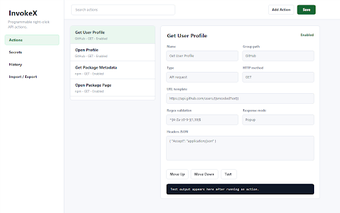
The extension turns highlighted strings on any webpage into actionable items, letting developers run API calls or open links from the right-click menu. It includes sample actions for tasks like GitHub user lookups and npm metadata queries, which show common templates. This makes the tool suited for workflows that repeatedly extract identifiers or package names from web pages and translate them into quick diagnostics or tool navigation steps.
How responsive is it in real developer workflows?
The extension executes configured requests from the browser context, so action timing depends on the target API's response rather than an external relay. It keeps a local execution history to revisit past requests and includes an integrated JSON response viewer with search and collapse functions for inspecting outputs without leaving the page. Those capabilities reduce context switching between browser windows and separate diagnostic tools during routine lookups.
How are secrets and telemetry handled?
Configuration and API credentials remain on the device because the extension stores secrets locally. The tool advertises a privacy-first approach with no default telemetry, so settings and stored credentials do not route to external analytics by default. That model gives teams local control over authentication tokens; development teams should still follow internal security policies when adding sensitive keys into any client-side extension.
Can teams customize actions and share configurations?
The extension supports structured customization through regex-based matching and nested action groups, and it uses templates for request construction. Shared configuration is possible via import and export so teams can distribute action sets. Typical template elements include:
- URL templates for link generation
- Header templates for API authentication
- Body templates for POST or PUT payloads
Who benefits and where it fits
The extension suits engineering and QA teams that standardize on Chromium-based browsers and accept initial configuration effort to make in-browser routines repeatable. It favors groups that prefer local configuration control and shareable action sets over immediate, zero-setup shortcuts. For teams that prioritize quick, repeatable in-page workflows within a Chromium environment, the extension is a practical productivity complement despite the upfront setup.